





Email marketing remains one of the most powerful and trusted digital marketing practices today. Although social media channels can be used effectively in reaching new audiences, the reality of the matter is that there is a limit to the number of people who will actually be able to see the content that you share.
According to marketing research published by HubSpot, email marketing is one of the top channels delivering the highest return on investment (ROI) for B2C brands.
Email marketing allows the website owner to reach out to the people who already have an interest in the brand.
When people join your email list, they are giving you permission to send them emails. This makes an email list one of the most valuable things that you can have for your website or online business.
For WordPress users, email marketing might seem like a complicated thing at first. There are so many platforms that require you to use other tools and programs just to get started. MailPoet is the solution here. MailPoet is a WordPress plugin designed to simplify email marketing by allowing website owners to manage subscribers, create email campaigns, and send newsletters directly from the WordPress dashboard. Instead of relying on multiple tools, everything can be managed in one place.
In this guide, you will learn how to build an email list in WordPress using MailPoet, how to create subscription forms, and how to send your first email newsletter. By following these steps, you can start building stronger relationships with your audience and increase engagement with your website content.
Why Email Marketing Matters for Websites
Email marketing is one of the best ways of communicating with your audience because it allows you to communicate directly with the people who want to hear from you.
There are many reasons why email marketing is important for website owners. Some of these reasons include:
- Direct communication with interested visitors
- Increase in return traffic to your website
- Promotion of new articles or products
- Building trust with your audience
- Independence from social media algorithms
For WordPress websites, it is recommended that you use a suitable tool to make email marketing easier to manage.

What is MailPoet and How Does It Work?
MailPoet is an email marketing plugin that is used in WordPress. It helps website owners manage their email marketing directly from the WordPress dashboard. You can learn more about the plugin on the official MailPoet website.
Some of the key features of MailPoet include:
- Creating lists of subscribers
- Designing newsletters
- Creating subscription forms
- Creating automated emails
- Tracking email performance
Because MailPoet is integrated into WordPress, it becomes easier for bloggers, small businesses, and website owners to manage their email marketing without using external platforms.
Being integrated into WordPress makes it easier to control your emails, your audience, and your content from one place.
Step 1: Installing the MailPoet Plugin
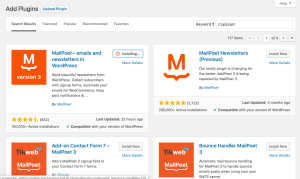
Before building an email list, the first step is installing the MailPoet plugin on your WordPress website.
Follow these steps to install the plugin:
- Log in to your WordPress dashboard
- Navigate to the Plugins section
- Click Add New Plugin
- Search for MailPoet
- Click Install Now
- Activate the plugin
Once activated, MailPoet will appear in the WordPress dashboard menu. From there, you can access the settings and start creating email lists and campaigns.
The plugin also provides a quick setup wizard that helps configure your email sending settings before sending your first newsletter.
Step 2: Creating Your First Email List
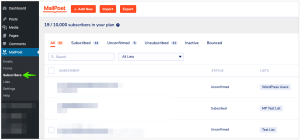
An email list is where subscriber email addresses are stored and organized. This list will be used when sending newsletters or updates to your audience.
To create an email list in MailPoet, follow these steps:
- Go to MailPoet in the WordPress dashboard
- Click Lists
- Select Add New List
- Enter a name for the list
- Add a short description if needed
- Save the list
Once the list is created, it will serve as the main destination for new subscribers who join your email community.
You can create multiple lists if your website serves different types of audiences or content categories.

Step 3: Creating a Subscription Form
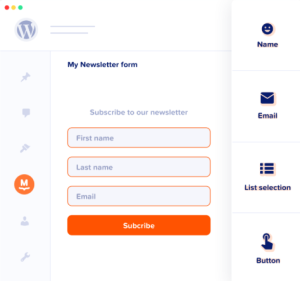
A subscription form allows website visitors to join your email list by entering their email address.
MailPoet provides a form builder that makes this process simple.
Follow these steps to create a subscription form:
- Navigate to Forms in MailPoet
- Click Create Form
- Choose a form layout
- Add fields such as name and email address
- Connect the form to your email list
- Save and publish the form
Subscription forms can be placed in several locations on your website, such as:
- Sidebar widgets
- Blog post footers
- Dedicated landing pages
- Pop-up subscription boxes
Strategically placing these forms helps increase the number of subscribers over time.
Step 4: Sending Your First Newsletter
After creating your email list and subscription form, the next step is sending your first email campaign.
MailPoet includes a built-in newsletter editor that allows you to design professional emails.
To send your first newsletter:
- Go to Emails in MailPoet
- Select Create Newsletter
- Choose a design template
- Add text, images, and links
- Select the subscriber list
- Schedule or send the email
You can use newsletters to share:
- New blog posts
- Website updates
- Promotions or announcements
- Educational content for subscribers
Sending useful and relevant content helps maintain engagement and encourages subscribers to remain on your email list.

Best Practices for Growing an Email List
Building an email list requires more than simply adding a subscription form to your website. The most successful email strategies focus on providing value to subscribers.
Here are several best practices to follow:
- Offer valuable and relevant content
- Place subscription forms in visible locations
- Avoid sending excessive email campaigns
- Write engaging subject lines
- Provide useful information in every email
Consistency and quality are key factors in maintaining a strong relationship with subscribers.
When readers feel that your emails provide real value, they are much more likely to stay subscribed and interact with your content.
Conclusion
Creating an email list is one of the most important steps for any website that aims to increase its audience and maintain a long-term relationship with its readers.
Using a tool like MailPoet can make this process much easier for WordPress users. With features for managing subscribers, creating forms, and sending newsletters, MailPoet allows website owners to manage their email marketing directly from the WordPress dashboard.
With the steps outlined in this guide, you can now start creating an email list, communicate with your audience, and improve your overall content marketing strategy.
Over time, a well-maintained email list can become one of the most valuable marketing tools for your website.
Want Help Growing Your Email List?
If you would like help setting up email marketing, newsletters, and subscriber automation for your website, the team at Clickoria Digital Marketing Agency can help. Contact Us Today!